

To rank higher on Google Maps, a business needs a verified and fully completed Google Business Profile, the most accurate primary category, consistent name, address and phone details across the web, a steady flow of genuine reviews with replies, fresh photos and updates, and a website that clearly confirms its location and services. Google ranks Google Maps results on three factors: relevance, distance and prominence.
Key takeaways
- Google Maps rankings are driven by relevance, distance and prominence: you can directly influence relevance and prominence.
- Your primary category is the single most important setting on your profile. Choose the most specific one that describes your main business.
- Reviews matter for both ranking and conversion: aim for a steady flow of genuine reviews and reply to every one.
- Consistency of your business name, address and phone number (NAP) across your website and directories builds trust with Google.
- Never use keyword-stuffed names, fake addresses or bought reviews. They can get your profile suspended.
- Most businesses see clear movement in 8 to 12 weeks of consistent work; competitive categories take longer.
Why Google Maps matters so much for Kerala businesses
When someone in Kottayam searches for “dentist near me”, “best biryani in Kochi” or “AC service Thiruvananthapuram”, Google usually shows a map with three businesses before any normal website results. This block is called the Local Pack, and the same businesses appear in the Google Maps app. For most local businesses (clinics, restaurants, shops, schools, service providers and hotels) these three positions bring more calls, direction requests and walk-ins than any other free marketing channel.
Kerala’s customers are highly mobile-first. A large share of searches for local services happen on a phone, often moments before the person makes a decision. If your business is not visible in that moment, the customer simply calls the competitor who is. That is why Google Maps ranking, part of what marketers call local SEO, has become one of the most valuable investments a local business can make.
The good news: unlike paid advertising, appearing on Google Maps is free, and the work that improves your ranking also improves how many people who see your listing actually contact you.
How Google decides which businesses rank on Maps
Google has publicly confirmed that Google Maps results are based mainly on three factors:
| Factor | What it means | Can you influence it? |
|---|---|---|
| Relevance | How well your profile matches what the person searched for | Yes (categories, services, description, website content |
| Distance | How far your business is from the searcher or the location in their search | Not directly) but you can be clear about your service areas |
| Prominence | How well known and trusted your business is, online and offline | Yes: reviews, ratings, links, mentions, activity |
Google also says that your position in organic web results contributes to prominence. In other words, a strong website helps your map ranking too.
What “distance” means in practice
Distance is the reason two people searching for the same thing in different parts of a town can see different results. A restaurant in Kottayam town will rarely appear for a person searching in Changanassery, no matter how good its profile is. You cannot change where you are located, but you can make sure Google knows exactly where you are (an accurate map pin) and which areas you serve if you visit customers.
What “prominence” means in practice
Prominence is Google’s estimate of how established and trusted you are. It grows with the number and quality of reviews, your average rating, mentions of your business on other websites, links to your website, how active your profile is and how well your website performs in normal search. This is where consistent work over months makes the biggest difference.
Step 1: Claim and verify your Google Business Profile
Everything starts with a verified Google Business Profile (formerly called Google My Business). Search for your business name on Google Maps. If a listing already exists, claim it; if not, create a new one at business.google.com.
- Use the real-world name of your business, exactly as it appears on your signboard, letterhead and invoices.
- Place the map pin precisely on your entrance, not the middle of the road.
- Complete verification using the method Google offers. This may be a video recording of your premises and signage, a phone or SMS code, an email or a postcard.
- If you serve customers at their location (plumbers, cleaners, tutors) and do not receive customers at your address, set yourself up as a service-area business and hide your address.
Step 2: Choose the right primary category
Your primary category tells Google what your business fundamentally is, and it has a stronger influence on ranking than almost any other setting. Choose the most specific category that describes your main activity, for example “Dental clinic” rather than “Doctor”, or “South Indian restaurant” rather than “Restaurant” if that is what you mainly are.
Then add secondary categories for other genuine services. A hospital might add “Diagnostic center” and “Pharmacy” if it offers them on the premises. Do not add categories for things you do not actually offer, irrelevant categories can confuse Google and attract the wrong enquiries.
Research what top-ranking competitors in your town use as their primary category. If all three businesses in the Google Maps Local Pack share a category you are not using, that is a strong signal.
Step 3: Complete every relevant section of your profile
Complete profiles are easier for Google to understand and more convincing for customers. Go through each section carefully:
- Business description: up to 750 characters explaining what you do, who you serve and where, written naturally for people. Do not stuff keywords or add links.
- Opening hours: including special hours for Onam, Christmas, Eid and other holidays. Wrong hours are one of the most common reasons for negative reviews.
- Services and products: list each service with a short description and, where appropriate, a price. These help your profile match more specific searches.
- Attributes: such as wheelchair access, Wi-Fi, online appointments, women-owned or parking. Choose all that genuinely apply.
- Contact options: phone number, website, appointment or booking links, and messaging if you can reply promptly.
- Opening date: this signals how established your business is.
Step 4: Build a steady flow of genuine reviews
Reviews influence both where you rank and whether people choose you. Google looks at the number of reviews, your average rating, how recent they are and whether you respond. Customers read them carefully: especially for clinics, schools, hotels and service businesses.
How to get more reviews the right way:
- Ask every satisfied customer, at the moment they are happiest: after a successful treatment, a delivered order or a completed job.
- Share your direct review link by WhatsApp, SMS, email and on printed QR cards at the counter.
- Make it easy: tell customers it takes less than a minute and they can write in Malayalam or English.
- Train staff to ask naturally rather than relying on one person to remember.
- Reply to every review, thank positive reviewers by name and respond calmly and helpfully to complaints.
What you must not do: buy reviews, offer discounts or gifts in exchange for reviews, ask only happy customers through a filter (“review gating”), or post reviews from staff and family. These break Google’s policies and can lead to reviews being removed or your profile being restricted.
How to respond to a negative review
Respond within a day or two, stay polite, acknowledge the experience, explain briefly if there was a misunderstanding and invite the person to contact you directly to resolve it. Future customers read your replies as much as the review itself. If a review is fake or breaks Google’s policies, you can report it for removal. But genuine criticism should be answered, not argued with.
Step 5: Add real photos and videos regularly
Profiles with plenty of good photos tend to receive more direction requests and website clicks. Upload real, recent images rather than stock photos:
- Exterior photos from the street, so people recognise your building and signboard
- Interior photos of your reception, seating, rooms or shop floor
- Your team at work, in uniform where relevant
- Products, dishes, treatments or completed projects
- Short videos, a quick walk-through or a behind-the-scenes clip
Aim to add new photos every month. Fresh visuals keep the profile active and give customers more reasons to choose you.
Step 6: Post updates and keep the profile active
Google Business Profile lets you publish updates, offers and events directly on your listing. Regular posts show customers, and Google, that the business is active. Post about new services, seasonal offers, festival greetings, health tips, new arrivals or recent projects, ideally every week. Each post can include a photo and a button such as “Call”, “Book” or “Learn more”.
Also keep an eye on any customer questions shown on your profile and answer them quickly and accurately, and reply promptly to messages if you have turned messaging on.
Step 7: Keep your name, address and phone number consistent everywhere
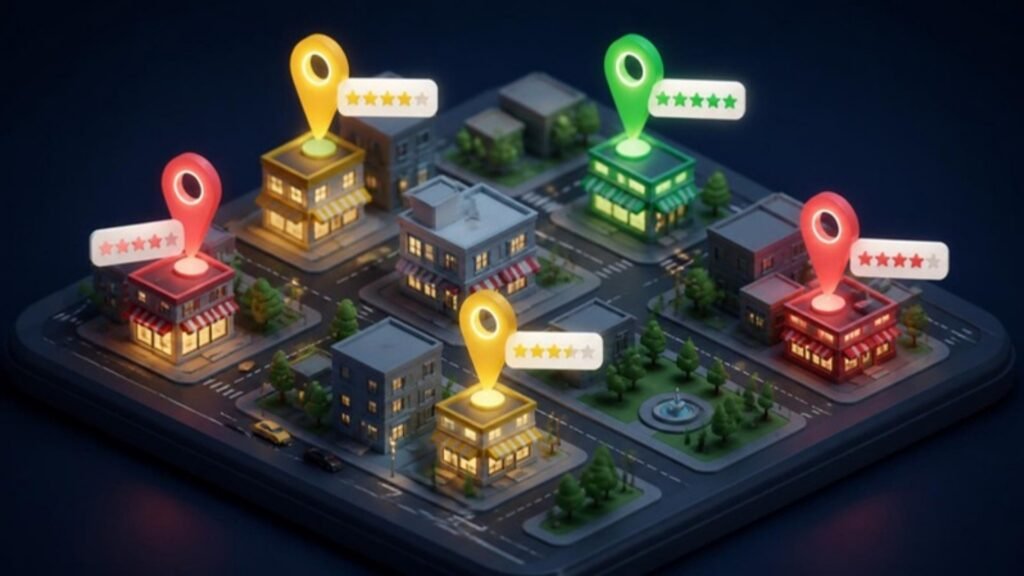
Google cross-checks your details with other websites to confirm that your business is real and where it says it is. Your NAP (name, address, phone number) should be identical on:
- Your website footer and contact page
- Facebook, Instagram and LinkedIn pages
- Indian directories such as Justdial, Sulekha and IndiaMART where relevant
- Industry listings: Practo for doctors, Zomato and Swiggy for restaurants, education portals for institutions
- Apple Maps, Bing Places and other map platforms
Small differences (an old phone number, “Rd” versus “Road”, or a former address) create confusion. Correct old listings and remove duplicate Google profiles (duplicates can split your reviews and rankings).
Step 8: Strengthen your website’s local signals
Your website is one of the strongest supporting signals for your Google Maps ranking. Make sure it:
- Shows your exact business name, address and phone number on every page, usually in the footer
- Has a dedicated page for each main service, explaining it in detail
- Mentions the town and areas you serve naturally, for example “dental clinic in Kottayam serving Ettumanoor, Pala and Changanassery”
- Embeds a Google Map on the contact page
- Uses LocalBusiness structured data (schema markup) to confirm your details to search engines
- Loads quickly and works perfectly on mobile phones
- Links to your Google Business Profile, and your profile links back to the most relevant page on the website
For businesses with several branches, create a separate location page for each branch with its own address, hours, photos and directions, and link each Google profile to its matching page.
Step 9: Earn local links and mentions
Links and mentions from other reputable websites increase prominence. Local opportunities include newspaper and news-portal features, local business associations, chambers of commerce, sponsorships of schools, sports clubs and events, supplier and partner websites, and community or church websites. Quality and relevance matter far more than quantity, one mention in a respected local publication is worth more than dozens of low-quality directory links.

Step 10: Track your rankings properly
Your ranking changes depending on where the searcher is standing. Checking from your own office only shows you one point. Professional local SEO uses geo-grid tracking, which checks your position from a grid of points across your town to show where you are strong and where you are invisible.
Also review your profile’s Performance insights every month:
- How many people viewed your profile on Search and Google Maps
- How many called, requested directions, visited your website or messaged you
- Which search terms people used to find you
Combine this with call tracking or a simple question at reception, “How did you find us?”, to understand real business results, not just views.
Step 11: Avoid the mistakes that hold businesses back
| Mistake | Why it hurts | What to do instead |
|---|---|---|
| Adding keywords to the business name (“ABC Clinic Best Dentist Kottayam”) | Breaks Google’s guidelines and can lead to suspension | Use your real-world name only |
| Using a virtual office or fake address | Profiles can be removed and reviews lost | Use your genuine premises or set up as a service-area business |
| Choosing a broad primary category | Weakens relevance for your main searches | Choose the most specific accurate category |
| Ignoring reviews | Lowers trust and conversions | Reply to every review within a few days |
| Duplicate profiles | Splits reviews and confuses Google | Merge or remove duplicates through support |
| Letting the profile go quiet | Signals an inactive business | Post weekly and add photos monthly |
| Accepting wrong suggested edits | Anyone can suggest changes to your details | Check your profile regularly and correct errors |
Step 12: Be patient and consistent
Local SEO is not a one-time setup. Most businesses see visible improvement within 8 to 12 weeks of consistent work. A fully optimised profile, a steady stream of reviews, weekly posts and corrected citations. In competitive categories such as hospitals, real estate or restaurants in city centres, reaching the top three can take several months.
The businesses that stay at the top are the ones that treat their Google Business Profile as an ongoing part of customer service: answering reviews, keeping information accurate and showing what they do every week.
When to get professional help
You can do much of this yourself with discipline. Many businesses choose a specialist when they have multiple branches, operate in a competitive category, have suffered a suspension, are struggling with duplicate or hijacked listings, or simply do not have time to post, photograph and reply every week.
LA DIGITS manages Google Business Profiles for 500+ businesses across Kerala, India and abroad: handling optimisation, weekly posts, photos, review responses, citation clean-up, geo-grid tracking and monthly reporting. See our Google Business Profile management service or our wider local SEO services, or request a free profile audit to see where you rank today.
Summary: rank higher on Google Maps
To rank higher on Google Maps, focus on the basics first: a complete Google Business Profile, the right primary category, genuine reviews with replies, fresh photos and consistent details everywhere online. Businesses that want to rank higher on Google Maps should treat their profile as a weekly routine, not a one-time setup. Google explains the main ranking factors in its own guide to improving your local ranking.
Looking for a partner you can trust? See why clients rate LA DIGITS the best digital marketing agency in Kottayam, Kerala.
Frequently asked questions
How long does it take to rank higher on Google Maps?
Most businesses see clear improvement within 8 to 12 weeks of consistent work on their profile, reviews, posts and citations. Highly competitive categories and city-centre locations can take several months to reach the top three.
Is Google Business Profile free?
Yes. Creating, verifying and managing a Google Business Profile is completely free. You only pay if you choose to run Google Ads or hire someone to manage the profile for you.
What is the Google Local Pack?
The Local Pack is the block of three businesses shown with a map at the top of Google search results for local searches. The same businesses usually rank highly in the Google Maps app.
What are the main Google Maps ranking factors?
Google says rankings on Google Maps are based mainly on relevance (how well you match the search), distance (how close you are to the searcher) and prominence (how well known and trusted you are, including reviews, links and organic rankings).
Does the number of reviews affect Google Maps ranking?
Yes. The number, average rating, recency and quality of reviews contribute to prominence. Reviews also strongly influence whether people choose to contact you.
Can I rank in a town where I do not have an office?
It is difficult, because distance is a core ranking factor. Service-area businesses can list the areas they serve, but they will generally rank best near their actual verified location. Do not create fake addresses. This breaks Google’s rules.
Should I add keywords to my business name on Google?
No. Your profile name must match your real-world business name. Adding keywords such as ‘best’ or a town name can get the profile suspended and is one of the most common reasons for listings being removed.
How do I choose the right Google Business Profile category for Google Maps?
Choose the most specific category that describes your main business as your primary category, then add secondary categories only for other services you genuinely offer. Checking the categories used by top-ranking competitors is a useful guide.
How often should I post on my Google Business Profile?
Weekly posting is a good standard. Regular updates, offers and photos show that your business is active and give customers useful, current information.
Do photos help Google Maps ranking?
Fresh, genuine photos make your profile more complete and engaging, and profiles with good photos tend to receive more direction requests and website clicks. Add new photos every month.
Can I pay Google to rank higher on Google Maps?
You cannot pay for higher organic Google Maps rankings. You can run Google Ads with location extensions to appear in sponsored positions, but organic ranking depends on relevance, distance and prominence.
Is it legal to buy Google reviews?
Buying reviews or offering rewards for reviews violates Google’s policies and can lead to reviews being removed or your profile being restricted. In India, fake reviews can also mislead consumers. Always collect genuine reviews.
How do I get my Google Business Profile verified?
Google offers verification methods such as a video recording showing your premises and signage, a phone or SMS code, email or a postcard. The options available depend on your business type and location.
Why did my Google Business Profile get suspended?
Common reasons include keyword-stuffed names, virtual or fake addresses, duplicate listings, a business type that is not eligible, or sudden changes to key details. Fix the issue and request reinstatement through Google’s support process.
What is NAP consistency in local SEO?
NAP stands for Name, Address and Phone number. Keeping them identical on your website, social media and directories helps Google trust that your business details are accurate.
Which directories help Google Maps rankings in India?
Useful listings include Justdial, Sulekha, IndiaMART, Apple Maps, Bing Places, Facebook and industry sites such as Practo for doctors or Zomato for restaurants. Accuracy matters more than the number of listings.
Does my website affect my Google Maps ranking?
Yes. Google says organic search ranking contributes to prominence. A fast, mobile-friendly website with clear location details, service pages and LocalBusiness schema strongly supports your Google Maps visibility.
How should I reply to a negative Google review?
Respond politely within a day or two, acknowledge the experience, briefly explain if needed and invite the reviewer to contact you directly. Avoid arguing, future customers read your replies.
What is geo-grid rank tracking on Google Maps?
Geo-grid tracking checks your Google Maps position from many points across your town, showing where you rank well and where you are not visible. It gives a far more accurate picture than searching from one location.
Can LA DIGITS manage my Google Business Profile and Google Maps ranking?
Yes. LA DIGITS manages Google Business Profiles for 500+ businesses across Kerala, India and abroad, including optimisation, weekly posts, photos, review replies, citations, geo-grid tracking and monthly reports. You can request a free profile audit to get started.
